OZO FHIR implementation guide - Local Development build (v0.9.0) built by the FHIR (HL7® FHIR® Standard) Build Tools. See the Directory of published versions
Authentication Practitioner
The primary assumption of providing access to practitioners is that they share the same identity provider as the OZO platform does. The secondary assumption is that the application that identifies the practitioner is a health care application and is part of the OZO network as a trusted participant. As the platforms share the same source of trust, the NutsEmployeeCredential can be leveraged to pass the user identity from the healthcare provider to the OZO platform. The credentials involved in connecting practitioners are:
- The
X509Credential, signed by the private key of a UZI certificate. - The
NutsOrganizationCredential, matching the URA number of the X509Credential - The
NutsEmployeeCredentialfor each logged in practitioner.
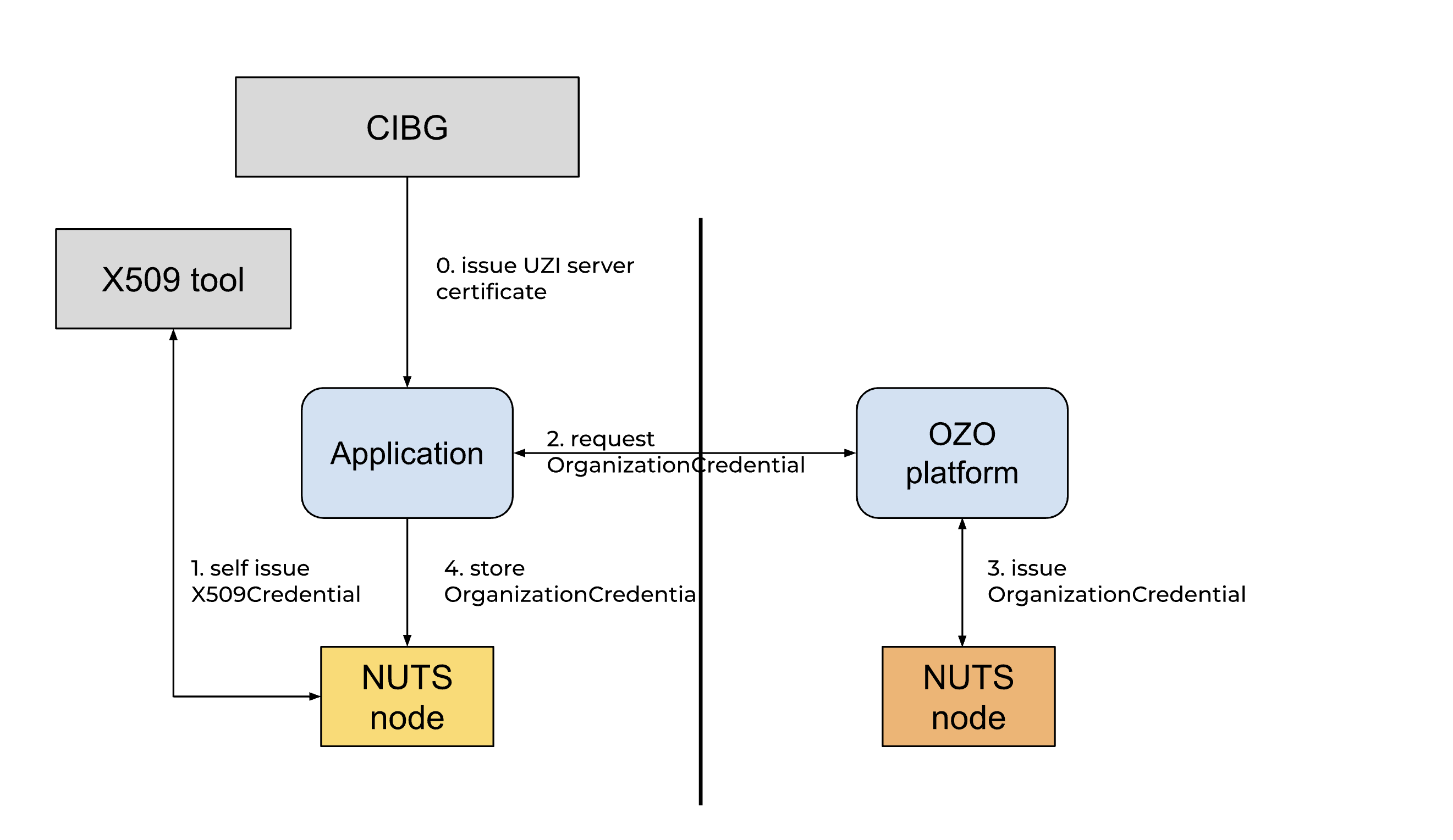
Explanation of NUTS architecture
Onboarding Health Care Providers
UZI Verifiable Credential
In order to act on behalf of a health care organization in the OZO network, a health care provider needs to identify themselves by an UZI server certificate. This certificate can be used to self-sign and issue an X509Credential. This credential is loaded in the organization wallet and is used to proof the UZI number ownership to the OZO network.
A tool on generating the UZI VC can be found at the Golang did:x509 and X509Credential Toolkit
NutsOrganizationCredential
The second stage of the onboarding is the NutsOrganizationCredential, this credential is issued by OZO in order to welcome the health care organization in the OZO network.
Onboarding overview
Explanation of the Diagram
Actors and Components
Actors:
user: Represents the end user initiating actions in the system.
Controls:
client_administrator: The primary control that interacts with different components to facilitate credential issuance and storage.x509_toolkit: A control used for issuing X509 credentials.client_nuts: A control used for managing credential-related actions, such as creating subjects and storing credentials.client_app: Represents the user-facing entry point into the client system.
Boundary:
ozo_administrator: An administrative boundary involved in issuing theNutsOrganizationCredential.
Control (Specific to OZO):
ozo_nuts: A special control within theozo_administrator.
Workflow 1: Self-sign X509Credential
Overview:
This workflow demonstrates the process of creating, signing, and storing an X509 credential.
- Creating a Subject:
client_administratorsends a request toclient_nutsto create a subject.client_nutsresponds by sending back adid:webto theclient_administrator.
- Credential Issuance:
- The
client_administratoruses thex509_toolkitto request issuance of a Verifiable Credential (VC), which includes:- UZI certificate
- Private key
did:web
- The
x509_toolkitreturns the signedX509Credentialto theclient_administrator.
- The
- Storing the X509Credential:
- The
client_administratorsends the signedX509Credentialtoclient_nutsfor storage.
- The
Workflow 2: Request NutsOrganizationCredential
Overview:
This workflow focuses on requesting, issuing, and storing the NutsOrganizationCredential.
- Credential Request:
client_administratorrequests theozo_administratorto issue aNutsOrganizationCredential, providing a URA number as input.
- Credential Creation:
- The
ozo_administratorforwards this request toclient_nutsto create theNutsOrganizationCredential. client_nutsreturns the created credential back to theozo_administrator.
- The
- Returning the Credential:
- The
ozo_administratorsends theNutsOrganizationCredentialto theclient_administrator.
- The
- Storing the NutsOrganizationCredential:
- The
client_administratorstores theNutsOrganizationCredentialinclient_nuts.
- The
Getting API access for a logged-in Practitioner
The trust is between OZO and the client application scoped at both organization and Practitioner level. For each organization the following must be arranged:
- The organization must have UZI server certificate.
- The organization must have an
X509Credentialsigned by the private key of the UZI server certificate. - The organization must have an
NutsOrganizationCredentiallinked to theX509Credentialwith the URA number. - The organization must have an IdP that is used to login
Practitionerin both the OZO platform and the client application. - The
Practitionermust be known in both the client application and the OZO platform.
The X509Credential and NutsOrganizationCredential reside in the wallet of the organization in the NUTS node.
The procedure of getting access to the OZO api starts with a request towards the NUTS node for an access credential. The Practitioner must be logged in to the application with the IdP of the Organization. To request an access_token, the client application needs to initiate the token request with a self-signed NutsEmployeeCredential that contains the id_token or SAML assertion of the IdP. The NUTS node starts a negotiation with the NUTS node of the OZO platform. As soon as the NUTS node of the client has presented the right Verifiable Credentials in de form of signed Verifiable Presentations, the NUTS node of OZO provides an access_token. The client application uses the access_token to access the OZO API. The OZO Api introspects the access_token and uses the information in the introspection result to apply search narrowing. Furthermore, the OZO Api must check the id_token or SAML assertion with the known IdP for the domain and must check if the URA number of the X509Credential matches the NutsOrganizationCredential
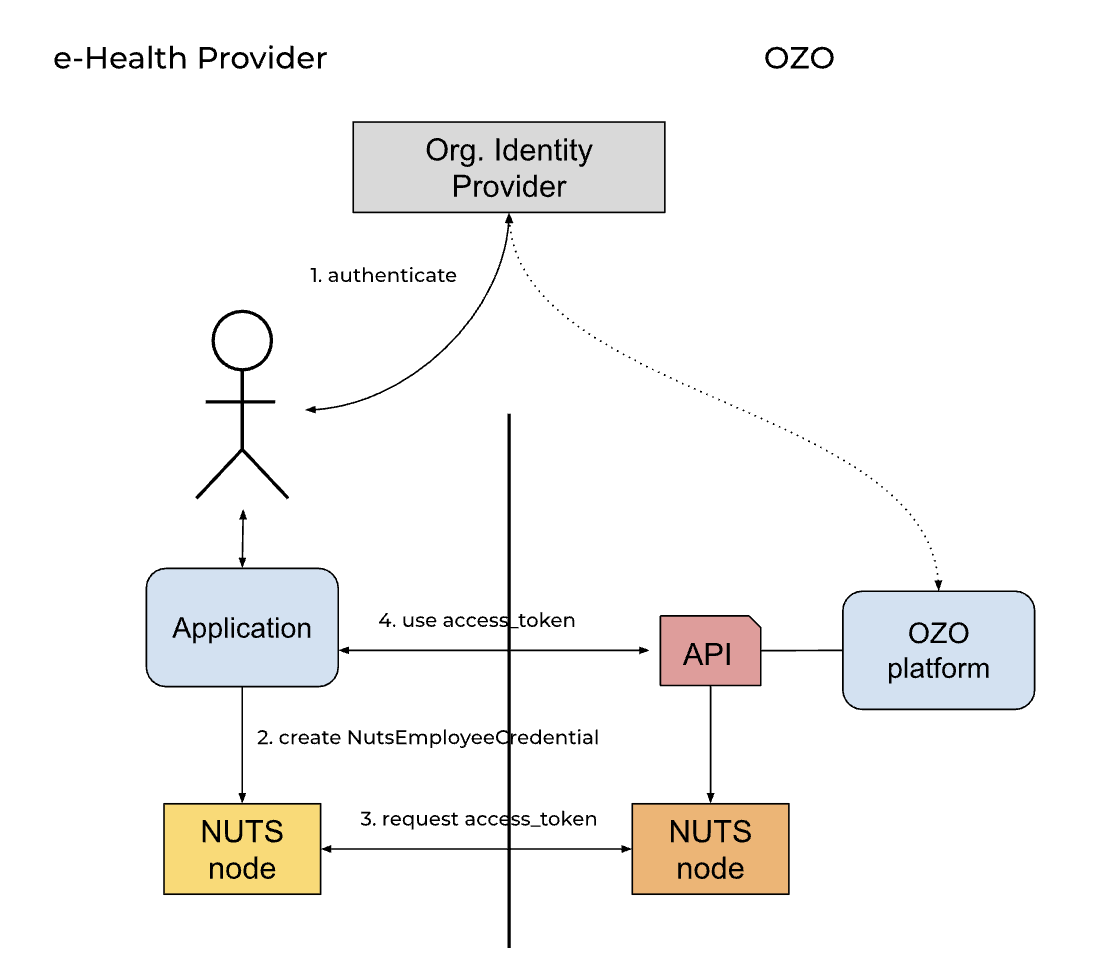
Diagram Description
The diagram illustrates a sequence of interactions between several entities to manage login, token acquisition, and secure API usage. The interactions are grouped into three key stages: Login, Get access_token, and Use access_token.
Actors and Components
- Practitioner (User): The end-user interacting with the system.
- Client App: The application facilitating interactions between the user and backend services.
- Client NUTS: A central service acting as a mediator for access management.
- IdP (Identity Provider): Performs user authentication and provides identity proofs (IdP assertions).
- NUTS OZO: The organization managing credentials and tokens in the NUTS ecosystem.
- OZO API: Backend API of the service being accessed.
- Entities Created:
- access_token: A secure token used for authentication of API requests.
- DPoP keypair: Used for securing access_token with proof-of-possession.
Process Breakdown
1. Login
- The Practitioner (User) interacts with the Client App to log in.
- The Client App requests authentication from the IdP (Identity Provider).
- The IdP authenticates the user and provides an IdP assertion (identity proof) to the Client App.
2. Get access_token
- The Client App creates a NutsEmployeeCredential using the received IdP assertion.
- Client App requests an access_token from Client NUTS, forwarding the necessary credentials.
- Client NUTS contacts the NUTS OZO system to request an access token for the user. It sends a set of credentials for validation:
- X509Credential
- NutsOrganizationCredential
- NutsEmployeeCredential
- NUTS OZO evaluates the request, validates the credentials, and creates an access_token.
- A DPoP keypair is additionally generated for the token.
- The access_token and the associated
dpop_kid(key ID) are returned to the Client App via Client NUTS.
3. Use access_token
Get DPoP token
- The Client App requests a DPoP token from Client NUTS.
- Client NUTS signs the request using the previously generated DPoP keypair and provides the DPoP token to the Client App.
Make API Request
- The Client App makes an authenticated API request (
GET /api/messages) to OZO API. The request includes:Authorization: DPoP access_tokenDPoP: dpop_token
Validate access_token
- The OZO API introspects the
access_tokenby forwarding it to NUTS OZO for validation. - NUTS OZO checks the token's validity and responds to the OZO API.
- Similarly, the DPoP token is verified by NUTS OZO, matching the DPoP proof against the access token.
- Additional checks include cross-verifying the credentials (e.g., ensuring the organization matches) and consulting the IdP for assertion validation if needed.
- Upon successful validation, the OZO API responds to the Client App with a
200 OKand the requested data.
Background access and subscription-driven pulls
Access tokens are short-lived (about 15 minutes). Within that window the same access token can be reused for multiple requests; only a fresh DPoP header must be requested per request. When the token expires, the client's NUTS node can request a new access token at any time without user interaction — the NutsEmployeeCredential is self-attested by the client application. The limiting factor is the validity of the embedded id_token or SAML assertion, which the OZO platform validates against the organization's IdP.
The NUTS node does not implement OAuth2 refresh tokens. To perform requests without an active user session — for example pulling changes after a subscription notification — the user context is kept alive at the IdP level instead:
- During login, the client application requests the
offline_accessscope (or the SAML equivalent) and stores the IdP refresh token per practitioner. - When a background pull is needed, the client application uses the refresh grant to obtain a fresh
id_tokenfrom the IdP. - The fresh
id_tokenis wrapped in a new self-issuedNutsEmployeeCredentialand a new access token is requested through the client's NUTS node, as described above.
This pattern keeps access scoped to the individual practitioner (the AAA proxy search narrowing keeps working), keeps the NEN7510 audit trail attributed to the practitioner on whose behalf the platform is acting, and automatically revokes background access when the practitioner is deactivated at the IdP — the refresh grant will simply fail.
The OZO platform accepts assertions obtained through a refresh grant under the following conditions:
- The assertion is issued by the trusted IdP for the organization's domain.
- The assertion is valid at the moment the access token is requested.
- OZO may enforce a maximum authentication age (based on the
auth_timeclaim); the maximum age is agreed upon per connected platform. - Background reads performed this way are attributed to the practitioner in the audit trail; the platform acts as the practitioner's agent, comparable to a mail client synchronizing a mailbox.